Creating a Routing Profile
A Routing Profile is a saved set of routing rules tied to its own API key. Any app using that key follows the profile’s rules automatically. No code changes needed after setup.Step 1 - Open the Playground
Click Playground in the left sidebar.📷 [Screenshot: Dashboard sidebar with Playground highlighted]
Step 2 - Click New Profile
In the Playground, hit New Profile in the top right of the profiles panel.📷 [Screenshot: Playground page with the New Profile button circled]
Step 3 - Fill In the Settings
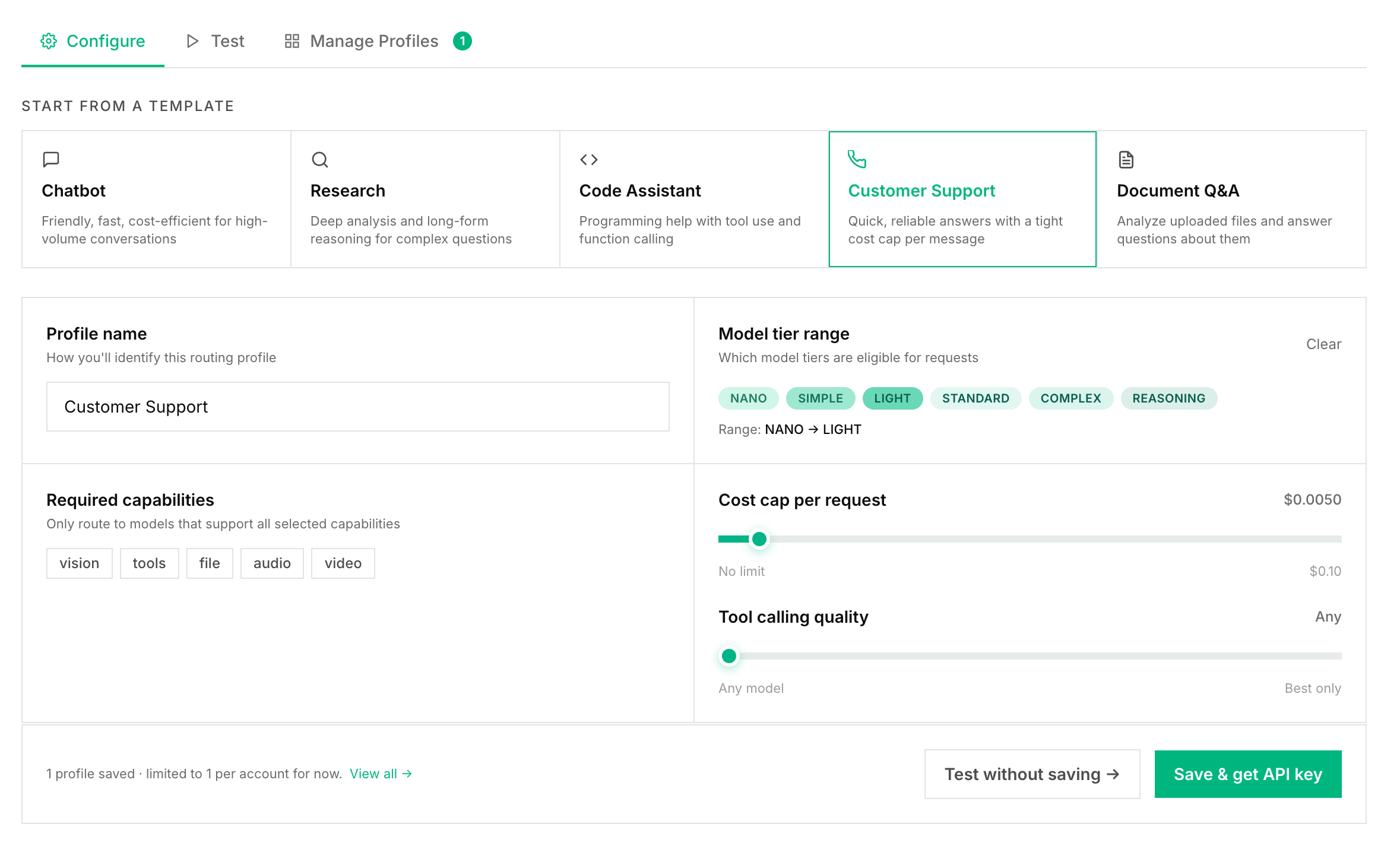
📷 [Screenshot: New Profile form with all fields visible]
Profile Name (required)
Name it after what it is used for. Good names:production-chatinternal-support-botcoding-assistantcustomer-onboarding
Tier Floor (optional)
The minimum tier Routor will use. Requests classified below this get bumped up. Use this when your app handles important tasks and you want a quality floor.| Setting | What it does |
|---|---|
LIGHT | Never uses NANO or SIMPLE |
STANDARD | Always at least STANDARD - good for production |
COMPLEX | Always uses a strong model |
📷 [Screenshot: Tier Floor dropdown with STANDARD selected]
Tier Ceiling (optional)
The maximum tier Routor will use. Requests classified above this get capped. Use this to control costs on apps where you do not need the most expensive models.Set a ceiling too low and quality will drop on harder prompts. Use carefully.
Capability Caps (optional)
Toggle which input types this profile handles.| Cap | What it does |
|---|---|
| Vision | Routes image requests to vision-capable models |
| File | Routes file requests to file-capable models |
| Tools | Routes tool requests to tool-calling models, ranked by BFCL accuracy |
| Audio | Routes audio requests to audio-capable models |
| Video | Routes video requests to video-capable models |
📷 [Screenshot: Capability caps with Tools and Vision enabled]
Cost Cap in USD (optional)
A maximum cost per request. Routor will only pick models whose estimated cost for the prompt is under this limit. Example:0.05 means no single request costs more than 5 cents.
BFCL Minimum Score (optional)
Only relevant if your app uses tool or function calling. BFCL is a public benchmark that measures how accurately models call functions. Setting a minimum score like0.85 means only models that clear that bar are considered for tool requests.
Leave this blank unless you are building an agent.
Step 4 - Save the Profile
Click Create Profile.📷 [Screenshot: Create Profile button at the bottom of the form]Routor will save the profile, generate a dedicated API key for it, and show you the key. Copy it now. It is only shown once.
📷 [Screenshot: Profile created with API key displayed and a Copy button]
Step 5 - Use the Profile Key
Swap your existing key for the profile key. That is the only change.Managing Profiles
From the Playground you can view all your profiles, see their settings, delete them, and test prompts against a specific profile to preview routing decisions before going live.📷 [Screenshot: Profiles list showing two profiles with tier settings and delete buttons]
Profile Limits
Accounts are limited to 1 routing profile for now. Creating a second profile returns a403 error: